Notius allows organizing notes to different views - boards. It let you view and manage notes depending on use-case. Boards are fully flexible, you can switch types at any time without affecting notes.
Board Types
Notes remain the same — only the layout changes.
Collection
Simple list of notes ordered by selected criteria like creation time, modification time. Notes in Collection can be groupped by day, week or month.
Grid
Notes in user-defined order.
Kanban
Column-based layout with drag-and-drop functionality. Perfect for workflows, processes, and organization by stages or by categories.
Board settings dialog
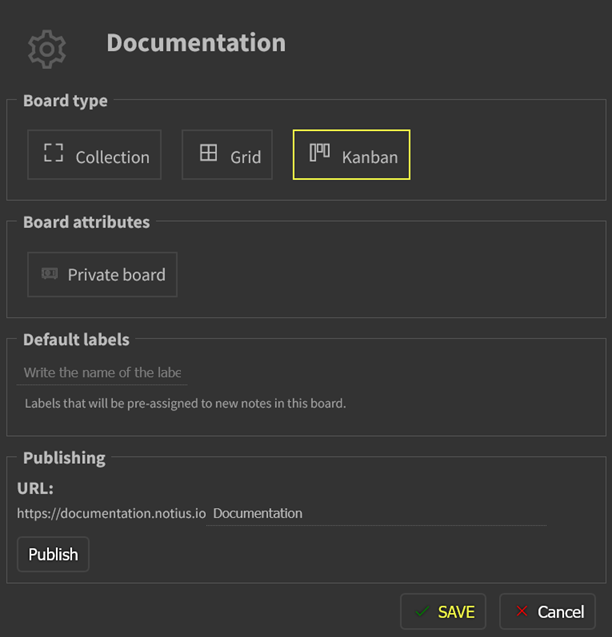 Board settings dialog
Using board settings dialog it is possible:
- switch board type from one type to another
- set board to private
- specify default label/tag to note created within the board
- publish to the web, making boards accessible as clean and structured pages. This allows you to:
- Share documentation or notes externally
- Keep internal documentation live and up-to-date
- Present content clearly, with a focus on readability
- note: this documentation is created using publish functionality
Organizing boards
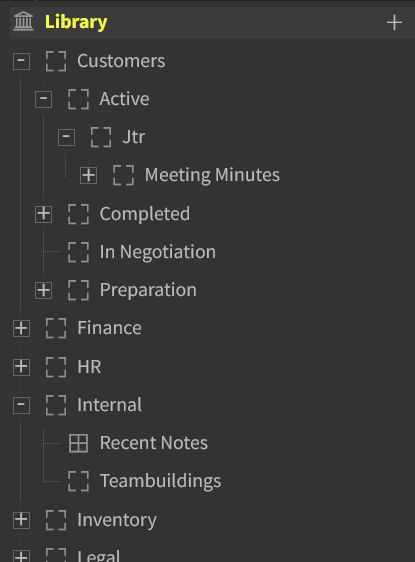 Board tree-view panel
Boards can be organized using left tree-view panel. You can move boards directly and create sub-boards if it is needed.