In Notius, note can belong to one or multiple boards at the same time. This is essential for reusing content without duplication or reorganizing knowledge as your projects evolve.
On the left panel, next to each board, you’ll find two key options: Link and Move.
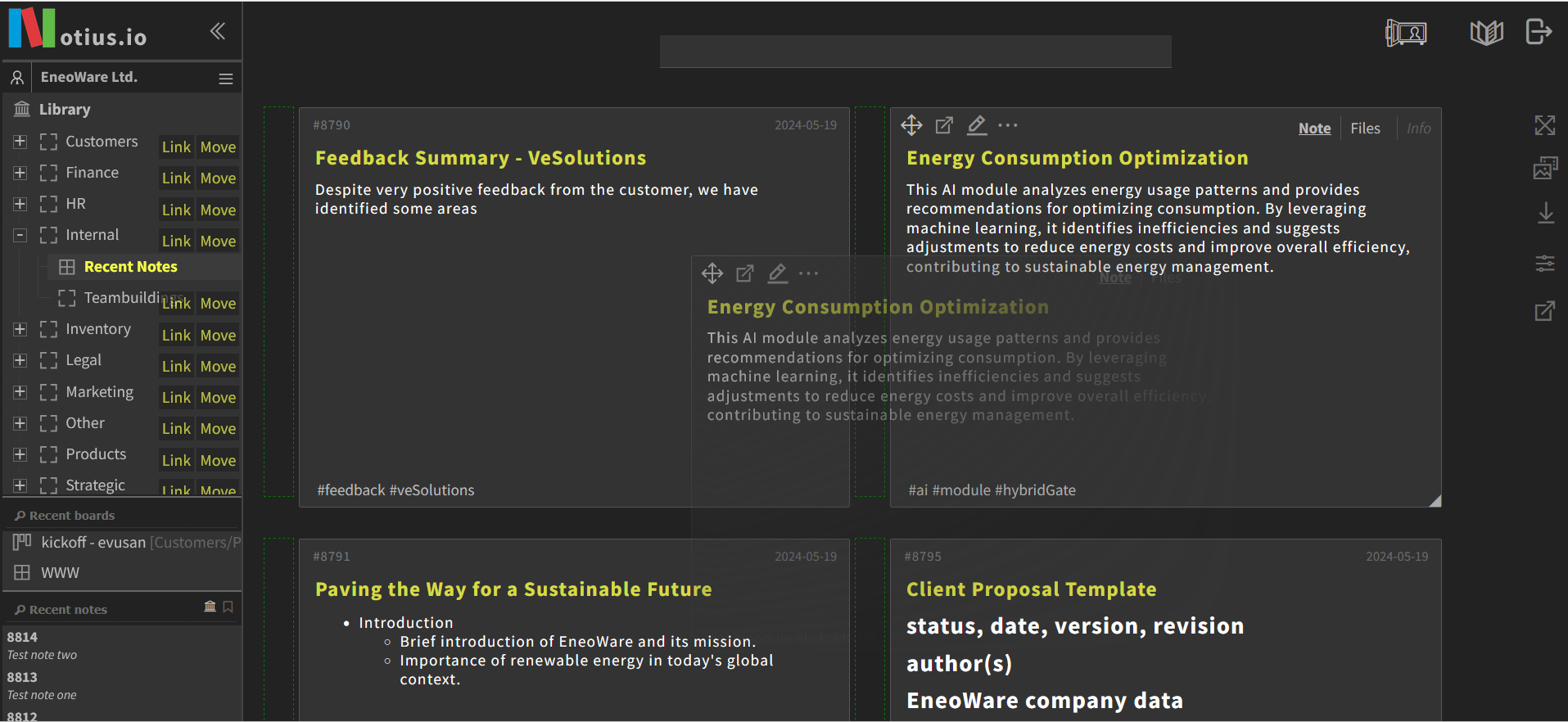 Note Link or Move example
In the screenshot above you see the Library structure with boards like "Customers", "Finance", "HR", and others. Next to each board, the Link and Move buttons are available to quickly manage notes. This gives you fastb reorganization possibility without needing to manually copy or duplicate note content.
Link a Note
Purpose: Share the same note across different boards.
Action: Drop note to Link will add the note to the selected board without removing it from its original board.
Result: The note appears in both places. Updates made to the note will reflect everywhere it is linked.
Use cases:
- A meeting summary relevant to multiple projects.
- A policy document that applies to several departments.
- Shared reference material across teams.
Move a Note
Purpose: Relocate the note entirely to a new board.
Action: Drop note to Move will remove the note from the current board and add it to the selected new board.
Result: The note will no longer appear on the original board, only on the destination board.
Use cases:
- Organizing drafts into final collections.
- Cleaning up project boards by archiving completed items.
- Transferring ownership of notes between teams.