The Library is a main view in Notius where you can access all notes across all boards. It's ideal for quick searching, updating or tagging notes without needing to navigate into individual board.
Collection has same functionality as Library but contains only notes manually included to it.
Key Features
Using right menu you can change display type, sort and group notes.
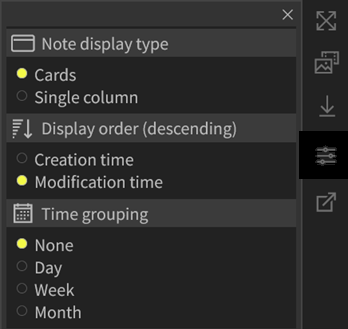 Groupping and sorting menu
Selecting display type
Notes can be displayed as:
- Cards - more notes in row
- Single column - notes are displayed in one column
Sorting Options
You can sort by:
- Creation date — See the newest notes first.
- Modification date — Track which notes have been recently updated.
Grouping by Date
Notes can be visually grouped by day, week, or month, providing a natural timeline-based structure. This makes it easy to review past activity or find recent work.
Bookmarked notes
By clicking to the top left Bookmarked only icon, you can display bookmarked notes.
 Bookmarked notes icon
Group notes examples